

General Ledger
Where can we see every debit and credit the operation has produced, account by account?
The general ledger is one shared table of debit and credit rows with a running balance per account. Each row records its subject, description, transaction date, and account — and keeps links back to the sale, purchase, and partner that produced it.
The filter panel
One shared table, narrowed until it answers the question.
3 of 6 rows
| Date | Account | Subject | Debit | Credit | Balance |
|---|---|---|---|---|---|
| 02 Jul | 1200 · Receivables | 4,820 | 4,820 | ||
| 04 Jul | 5100 · Purchases | 1,960 | 6,780 | ||
| 11 Jul | 5800 · Stock loss | 240 | 2,200 | ||
| This row came fromWarehouse write-off WO-114Rows keep links to the sale or purchase and the partner behind them. | |||||
Select a subject to open its provenance. Most rows are written automatically when sales, purchases, payments and cash transactions are saved; adjustments can be entered directly against an account.
How it works
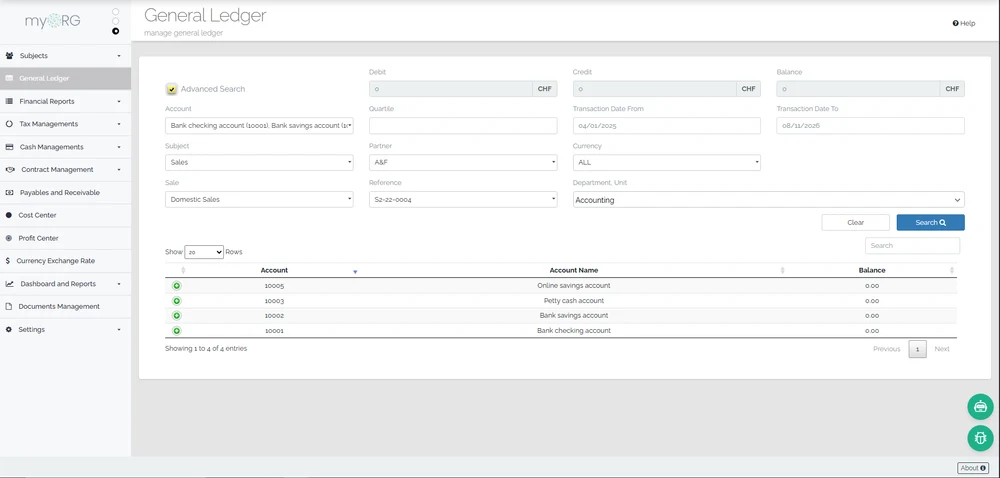
The ledger screen opens with an account filter panel: pick one or more accounts, a date range, a subject, partners, a department, document references, or a currency, and the matching rows list with their Debit, Credit, and Balance columns. Because rows carry foreign keys to their source sale or purchase and to the partner involved, a ledger row is never an orphaned number — you can trace it to the operational document behind it.
Most rows arrive automatically from the posting engine when sales, purchases, payments, and cash transactions are saved, and warehouse write-offs post here too. Manual entries are also supported for adjustments: a create screen writes a ledger row directly against a chosen account.
continON maintains this as an operational ledger. There is no period-close step and no statutory statement templates — organizations that need certified statutory accounts keep those in their accounting system of record and use this ledger for day-to-day operational visibility.
In the product
General Ledger screen with account filters and Debit / Credit / Balance columns.
What that gives you
- Filtered account views
- Accounts, date range, subject, partners, department, reference, and currency combine into one filter panel over the shared ledger.
- Row provenance
- Ledger rows carry links to the originating sale, purchase, and partner, so operational documents and their postings stay connected.
- Running balance per account
- Each row records the account balance after it, giving a per-account running position without a separate balance table.
- Manual entries
- Adjustment rows can be entered directly against an account alongside the automatically posted ones.
- Fed by four document types
- Sales, purchases, standalone payments, and cash transactions all write rows here — as do warehouse write-offs with their chosen account.
What this touches
- Chart of accounts
The account structure the ledger is filtered and grouped by. - Automatic posting
The mechanism that writes most ledger rows from operational documents. - Payments
Payments carry credit and debit accounts and surface in the ledger when posted. - Stock write-offs
Damaged and expired stock write-offs post rows with their justification trail. - Sales management
Sale documents are one of the ledger’s main row sources.