

People & Work
Project Management
continON treats a project as an operational record: a referenced entry with a customer, contract links, dates, an owning unit and manager, and a percent complete that moves as work is done. Planning happens on an interactive Gantt with dependencies and milestones, and resources are matched on skills and availability from the same employee, position, and equipment records the rest of the suite runs on.
The runThe project
Ends atClosed with an outcome record
The operating model
Project work touches almost every other record in an organization: the people who do it, the equipment and consumables it uses, the customer and contracts it is delivered under, and the documents it produces. continON keeps projects inside that record set instead of in a separate planning tool. A project references a customer partner, links contracts, is owned by an organization unit, a position, and a manager, and attaches its files directly.
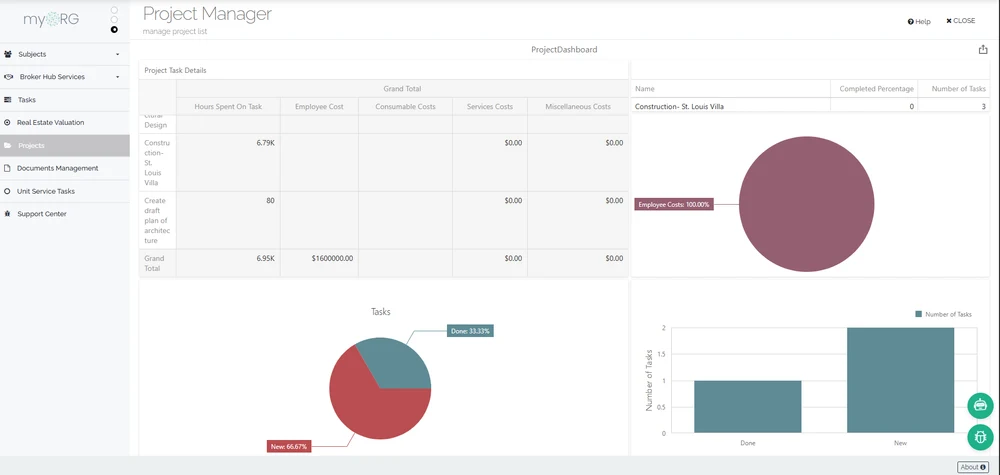
The working sequence is concrete: register the project, lay out tasks and milestones on the Gantt with dependency links and the organization calendar shaping dates, then assign resources — employees filtered by unit, position, and skill level with an availability check, and equipment or consumables drawn from warehouse records. While work runs, task risks are scored by probability and impact, projected cost is computed per resource type, and a project-scoped dashboard reads live data through a project parameter.
Execution detail lives in the Task Management module — the Gantt rows are the same task records assignees update and report activities against — and working time flows through task-linked timesheets in Human Capital Management. At the end, the project closes with an outcome record: completed with a client satisfaction score and a cost-benefit note, or failed with documented reasons.
Runs across
The project
Closed with an outcome record
- Schedule
- People
- Assets
- Cost
Register the project
Create the project record with its reference, customer, contract links, start and estimated end dates, owning unit, position, and manager.
Plan the schedule
Lay out tasks and subtask levels on the Gantt, link dependencies, flag milestones, and let non-working days and holidays from the organization calendar shape the dates.
Assign resources
Filter employees by unit, position, and skill level, check their availability for the task window, and add equipment, consumables, and services from warehouse records.
Execute as tasks
Assignees update statuses, report activities with working time and equipment used, and check in against their tasks so time lands on the work.
Monitor risk, cost, and progress
Score task risks by probability and impact, review projected cost per resource type, and read the project-scoped dashboard.
Close with an outcome record
Complete the project with a client satisfaction score and cost-benefit analysis, or record it as failed with reasons and documents attached.
In the product
Projects register list with status and percent-complete columns, one project opened on its record tabs.
Everything inside Project Management
7 capabilities
- Project Records & Register
How are projects set up and tracked as records? - Gantt Planning & Milestones
How do we plan schedules, dependencies, and milestones? - Resource Allocation
How are people, equipment, and partners assigned to project work? - Projected Cost
How do we see what a project’s work is expected to cost? - Project & Task Risks
How are project risks recorded, scored, and mitigated? - Per-Project Dashboards & Reports
How do we monitor a running project without building a spreadsheet? - Completion & Failure Records
What happens in the system when a project finishes — or fails?
Connected through one operating model
Project Management does not stand alone.
Records cross module boundaries without being re-entered — these are the relationships continON actually maintains.
- Task Management
Execution tasks carry the project id, and their statuses and progress roll up to the project record. - Human Capital Management
Employee records and their schedules are the people side of the resource Gantt. - Asset Management
Equipment lines reference the same asset articles tracked in the asset register. - Warehouse Management
Consumable and material lines name the warehouse they draw from. - Contract Management
Projects reference one or more customer contracts, and the linked contracts list renders on the project screen. - Document Management
Project, task, and activity files are stored through the shared document layer.
See Project Management on your own operations.
A guided walkthrough on a sanitized demo tenant — this module, the shared platform, and a connected workflow end to end.