

PlatformBuilders
Six kinds of definition, and they point at each other.
A configuration tool that produced six unrelated artefacts would be six tools. What makes definitions a platform layer in continON is that they are bound: one saved query is read by four other families, and one process reaches a form, a document, a notification, a task and a seat. Change the query and everything downstream of it changes with it.
Reading the ties Each family lists what it is bound to. A tie to another definition is marked in teal; a tie out to something that runs is marked in outline. The counts are not levelled — two families carry most of the fabric, and that is the point.
What each family defines, and what it is tied to.
Process
States, the transitions between them, who acts at each one, and what happens when a transition fires. It is stored as a definition and advanced by a running engine — the same object is both the drawing and the behaviour.
The process builderForm
the form a state shows and captures
Document
a document generated on a transition
Query
data read, and stored procedures run
The seat
who acts, resolved by relationship rather than by name
Notifications
email and in-app messages raised on a transition
Tasks
work generated for someone to do
Query & data source
A saved, parameterised read — against continON’s own data or a database you already run. Saved queries are first-class objects, which is why four other families can point at one rather than each carrying its own.
The query builderForm
the data a field or grid is populated from
Report
the rows a report renders
Dashboard
what a widget counts
Document
the values merged into a template
External sources
a system that stays where it is
Form
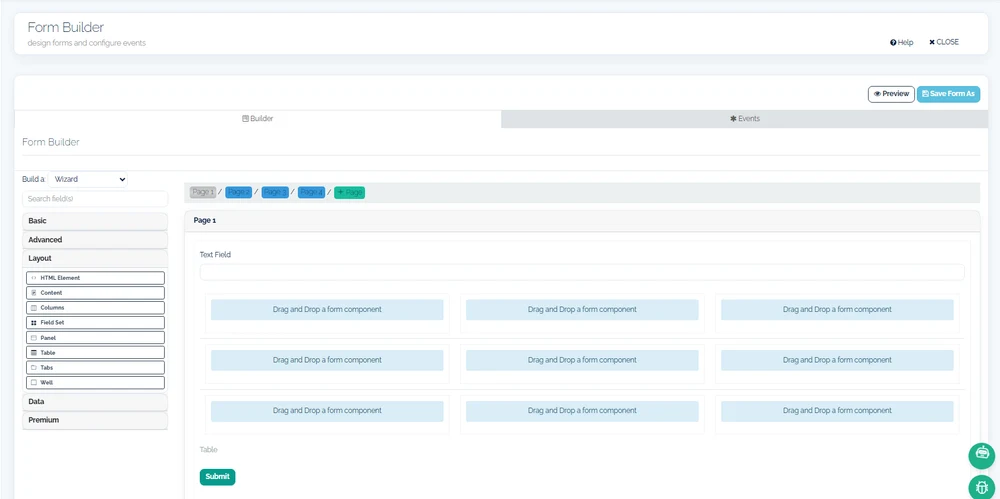
What is captured and shown at a point in a process — fields, validation, layout, and multi-page sequences. Versioned, so changing one does not rewrite what was already submitted against the previous version.
The form builderProcess
the state this form belongs to
Query
where its options and grids come from
Dashboard
a dashboard embedded inside the form
Document template
The layout of a document that continON produces — a contract, a letter, a certificate — with the fields it merges. Producing one is a step in a process, not a separate export job.
Document generationQuery
the values merged into it
The document service
where the produced file is stored and permissioned
Report
A rendered, filterable view of operational data, filed into categories and bound to the process state it belongs to.
The report designerQuery
the rows it reads
The seat
who may open it — granted to seats and to partners
Dashboard
Widgets over the same saved queries, parameterised by context — so one definition serves every project, unit or partner rather than being copied per audience.
Query
what each widget measures
Form
the form it can be embedded in
The seat
who may see it — granted to seats and to partners
Three different things get called “configuration”. These are not the same.
Interpreted at run time
Processes, forms, reports, dashboards and document templates are stored as definitions and read live. Changing one changes what the next request does, with nothing rebuilt and nothing redeployed.
Real schema, really changed
The data-source builder can create and alter tables from what you enter. That is genuine schema change, executed against your database — powerful, and not the same thing as editing a definition.
Written code, where it is needed
Forms can carry event handlers written in JavaScript, and a process step can run a stored procedure. This is the extension point, and it is the reason continON is not described as a no-code product.
Most operational change is the first of those. Some is the second. A small amount is the third, and continON says so rather than describing itself as codeless — because the moment a requirement outgrows the designers, the honest answer matters more than the claim.
What is shown here, and what is not.
The Form Builder, in wizard mode: one definition of the six, with the pages a request will be walked through and the palette its fields come from. That is the definition side of the binding this page is about. What no still can show is the other side — the request that opens this form when it reaches the state the form is bound to — and nothing is drawn to pretend otherwise.
Change one definition and watch what moves.
On a sanitized tenant: edit a saved query, then open the report, the dashboard and the form that read it — and submit a request that generates a document from the same data.