

Buildersbuilder
Document Template Designer
How do we stop assembling orders, confirmations, and letters by hand?
Author a document template in a word-processor-style editor, with merge fields bound to a saved query. When a process reaches the right step, the template executes its query with that request’s context and produces the finished PDF.
How it works
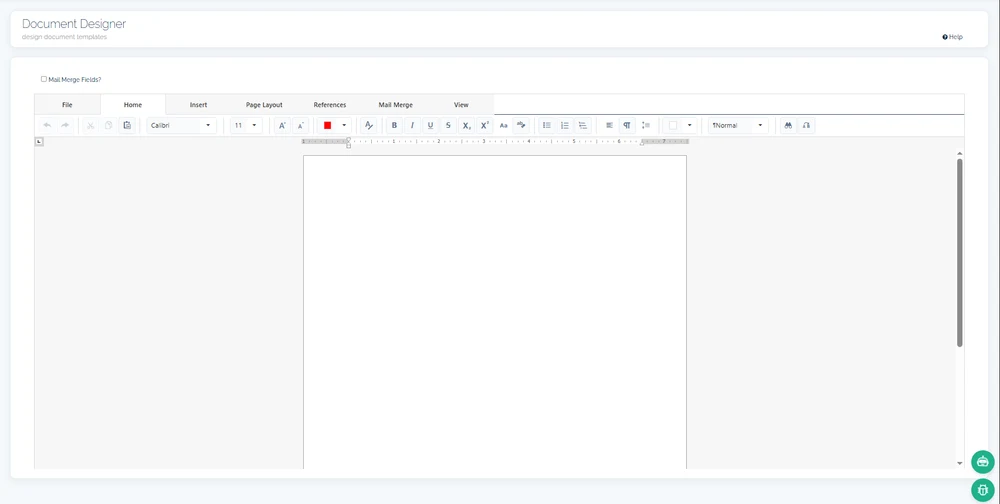
A template carries the fixed layout of the document — headings, tables, standing clauses — plus merge fields: placeholders mapped to the fields of a saved query. Authoring happens in a rich, word-processor-style editor, so the finished order confirmation or official letter reads exactly the way it should.
Generation follows one pipeline every time. A running process resolves the template by name, executes its bound query with the request, process, and employee identifiers of the record in hand, merges the returned fields into the placeholders, and exports the result to PDF. Nobody copies last month’s file; the document is produced from the record itself.
Producing a document and governing it are deliberately separate jobs. The template and the pipeline belong to the Builders; the finished file is filed into the governed document store, where folder and file access is granted by position, employee, or partner — so who may read the output is never baked into the template that produced it.
The sequence
4 stepsAuthor the template
Lay out the document and place merge fields where record data belongs.
Bind the query
Map the template to a saved query that defines exactly which fields it may merge.
Generate in the process
A workflow step resolves the template by name and runs the query with the record’s own context.
Export and file
The merged document renders to PDF and is filed in the governed document store with its record.
Worth knowing
- Merge fields with a defined sourceEach placeholder maps to a field of one bound query — the template cannot quietly pull data from anywhere else.
- Record context passed automaticallyThe request, process, and employee identifiers of the triggering record parameterize the query, so the right row merges every time.
- PDF as the output artifactEvery generation renders the same layout to PDF from the current record — one authoritative output per record, not a drawer of near-duplicates.
- Produced at the right stepTemplates bind to process states, so the document appears when the work calls for it rather than when someone remembers.
What this touches
- Process Builder
A transition triggers generation, so the document is a step of the workflow itself. - Query & Data Source Builder
The bound query defines and limits the data a template merges. - Document Management
Generated PDFs are filed into the governed store, permissioned by position and partner. - Document layer overview
The platform-level view of how generated and uploaded documents share one store.
See document template designer running in continON.
A guided walkthrough on a sanitized demo tenant — this capability inside its module, on the shared platform.