

Buildersbuilder
Form Builder
How do we put a new form in front of the team and have it drive real work?
Assemble a form from a palette of field controls, version it, and bind it to a process state — or run it standalone. When someone submits it, the workflow it belongs to advances and carries the captured data with it.
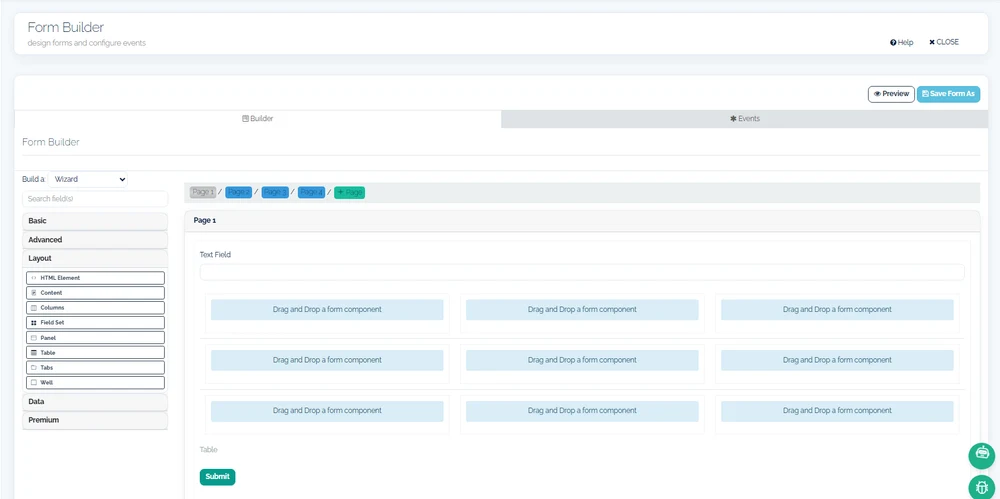
How it works
Forms are assembled from a curated palette: text, number, checkbox, radio, select, textarea, date-time, file upload, signature, and mobile-phone controls, plus data grids, tables, and tree controls for repeating rows. Long intake can be split into a multi-page wizard whose pages are wired to the events of the workflow the form belongs to.
Every form is a versioned object. Each saved revision is retained, and where configuration is not enough, custom JavaScript event handlers can be attached — stored and versioned alongside the form itself, so behavior changes are as traceable as layout changes.
A form earns its place by where it binds. Attached to a process state, it opens when work reaches that step and its submission advances the instance; run standalone, its submissions are stored as records in their own right. Fields draw lookups, defaults, and submit actions from saved queries in the shared data layer, so what users pick from is live data, not a hard-coded list.
What you define, and what runs
A palette for real intake
Signature capture, file upload, date-time, phone-number controls, and repeating-row grids cover operational intake, not just contact forms.
Wizard multi-page forms
Break a long form into guided pages, with page events wired to the workflow the form serves.
Explicit versioning
Forms and their event logic are versioned per revision, so you can see what a past submission was actually filled against.
Query-backed fields
Selects, defaults, and lookups resolve from saved queries in the shared data layer — one definition feeding many forms.
Standalone or process-bound
The same designer produces forms that drive workflow states and forms that simply capture records on their own.
Extend with scripting
Where a rule outgrows configuration, attach JavaScript event handlers — a stated extension point, not a hidden workaround.
What this touches
- Process Builder
A form bound to a state opens when work arrives there; submitting advances the request. - Query & Data Source Builder
Saved queries supply the lookups and defaults a form presents, and receive what it submits. - Document Template Designer
Data a form captures merges into the documents the same process generates. - My continON
Self-service requests present the bound form for whatever state a request is in.
See form builder running in continON.
A guided walkthrough on a sanitized demo tenant — this capability inside its module, on the shared platform.