

SolutionsWorkforce operations
The organization is stored first. People are how it gets staffed.
continON models units, positions and seats before it models employees. Access, approval routing, notifications, scheduling and pay all resolve against the seat — so when someone joins, moves or leaves, the operation does not have to be re-wired around them.
Four of these persist.
One of them changes hands.
- HQMy organization
- DepartmentProduction
- SectorCentral Supply Warehouse
- SeatWarehouse Lead · one holder
- Personassigned for a period
Each level decides something the one above it cannot.
Unit
The organization nests as deep as it actually is.
Units sit inside units without a fixed number of levels. Each one records its type — headquarters, department, sector, branch — along with its parent, its own currency and logo, and the address that makes it a real place.
Resolves hereWhere a location, a currency and a reporting parent come from.
Position
A job is defined once, before anyone holds it.
A position carries its reporting line, its pay grade, its base pay and the responsibilities that belong to the title itself — not to whoever is currently doing it.
Resolves hereWhat the job is, independently of the person.
Seat
Placed into a unit, the same title behaves differently.
A position placed in a unit becomes a seat, and the seat is where authority actually lives: head-of-unit and managerial flags, a clearance level, a maximum number of holders, and its own editable job description.
Resolves hereAuthority, clearance, and how many people may hold it.
Employment assignment
A person occupies the seat for a period of time.
The assignment binds a person to a seat, a unit and a manager between dates, carrying the contract number, the contract expiry and the wage rate. Assignments are historized: the current one is flagged and the previous ones stay on record.
Resolves hereWho is in the seat now, on what terms, and who was before.
Work
What was actually done attaches back to the seat.
Rosters generated from shift and rotation settings, browser check-in and check-out, weekly timesheet lines that point at real tasks with percent complete, and leave requests approved both as a request and day by day.
Resolves hereWhat happened, against the seat that owns it.
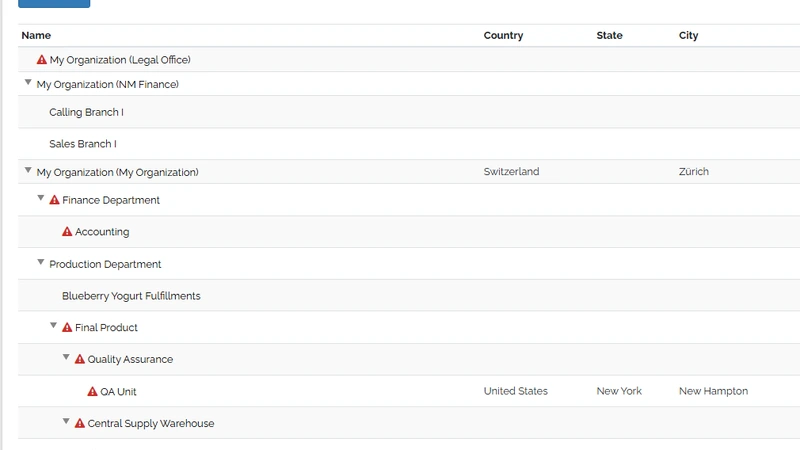
What the platform reads Every rung above is one of these rows. Access rules, approval routing and reporting scope all read this same tree, which is why keeping it current is what keeps them current.
What belongs to the seat, and what belongs to the person.
Attached to the seat
Stays when the holder changes.
- Reporting line and pay grade
- defined on the position
- Head-of-unit and managerial flags
- set where the position is placed
- Clearance level and staffing limit
- per seat, not per person
- The job description
- editable on the seat, used by vacancies
- Permission bundles
- granted to positions in the chart
- Approval routing and notification targeting
- resolved against the chart at run time
Attached to the person
Bounded by the assignment that created it.
- The employment assignment
- contract number, dates, wage rate
- Timesheets
- lines pointing at real tasks, approved by a manager
- Leave balance and per-day approvals
- by leave type
- Training attendance and skills
- syllabus, evidence, taxonomy
- Appraisal for the period
- per-unit evaluation questionnaires
- The self-service workspace
- schedule, requests, documents, pay
When the seat changes hands
- Assignment endsThe previous holder’s record is flagged closed and kept — dates, contract and rate stay readable.
- The seatUnchanged. Flags, clearance level, staffing limit, job description and permission bundles are properties of the position in the unit.
- Assignment beginsThe new holder inherits the seat’s authority on the day the assignment starts. Nobody re-issues permissions or re-points approval routes.
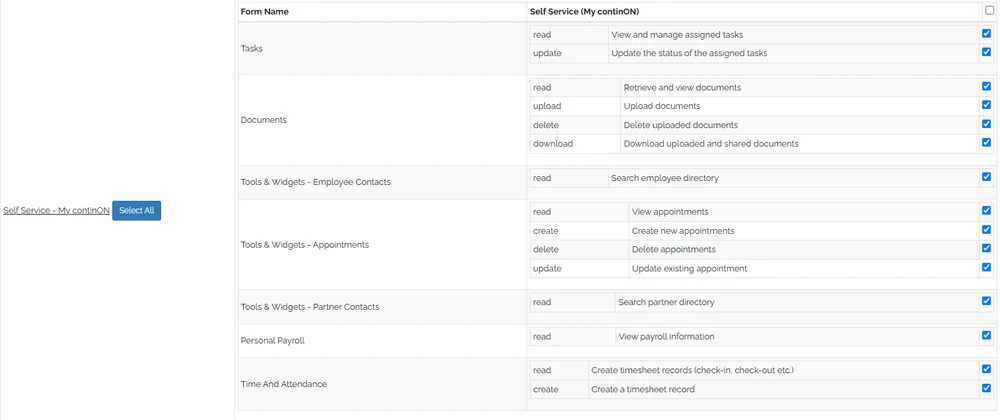
The bundle is maintained once. It is bound to a position in the org chart, which is why the handover above needs no access work. How identity and access work
What the rest of continON asks the org chart.
- Who has to approve this?
- A process state names an actor rule — the initiator, their supervisor, the head of the unit, or a named group of positions — and it resolves against the chart as it stands that day. Process Builder
- Who may open this screen?
- A permission group bundles application and privilege grants and is bound to a position, so access is a property of the seat rather than of an account. Users & permissions
Identity & access - Who is on shift?
- Rosters are generated from shift settings and rotation patterns — days worked, days off — and produced as both an employee schedule and a team schedule. Duty roster & scheduling
- What did this work cost?
- Timesheet lines point at the tasks they were spent on, and the payroll run reads the wage rate on the employment assignment rather than a separately maintained figure. Timesheets & approval
Payroll runs & calculation - Who is away, and does the balance allow it?
- A leave request is stored as per-day records and checked against the balance for that leave type, with approval at two levels — the request, and each individual day. Leave management
- Where does the employee see all of it?
- One self-service workspace shows the schedule, the requests raised, the documents filed and the pay calculated for that assignment. My continON
Bring your own org chart.
A guided walkthrough on a sanitized demo tenant: your unit structure, a seat with its clearance and limit, an assignment starting, and the approval route that follows it.