

Buildersbuilder
Process Builder
How do we change an approval or operational process without a software project?
Map a process on a visual canvas: its states, the transitions between them, who acts at each one, and what fires on every move. Submitted requests then advance through those exact states, routed to whoever currently holds the right position.
The instance
One definition. Every request that follows it.
Definition v3 · published
- Submitted
- Unit review
- Finance review
- Approved
- Actors
- Head of unit
- Time limit
- 48h → escalate
- Verification
- Required to pass
- Stakeholders
- May be added in flight
- Form bound
- Notification
- Generate document
- Create task
Live request #4471
- Unit reviewHead of unitactive
- Finance reviewFinance groupactive
Two states active at once — the review tracks that genuinely run in parallel are modelled as parallel, not queued behind each other.
Actors resolve against the org chart as it stands today, not a name written into the definition.
Requests advance state by state under the definition, keeping their activity trail as they go.
How it works
A process is drawn as states and transitions on a canvas. Each state carries its own configuration: the actor groups who may act there, a time limit with an escalation target for overdue steps, whether extra stakeholders may be added, cancellation rules, and whether the step must pass verification against your documented standards before work continues. Definitions are stored as versioned metadata, so publishing a change does not mean redeploying an application.
The same definition executes. Submitting a request creates a live process instance whose current state advances transition by transition, and an instance can hold more than one active state at once — real parallel branches, not a single linear pointer. Before any move, the engine validates that the target state is actually reachable through the defined transition graph.
Actors are resolved at runtime rather than hard-wired. A stage can target the initiator, the initiator’s supervisor, the current user’s supervisor, the head of the unit, a person selected during the request, or a named group of positions — all resolved against the org chart as it stands that day. A process also carries its own placement: target groups, entry criteria, and the menu position where users find it, and it can be set to run at first sign-in, after login, or before logout.
In the product
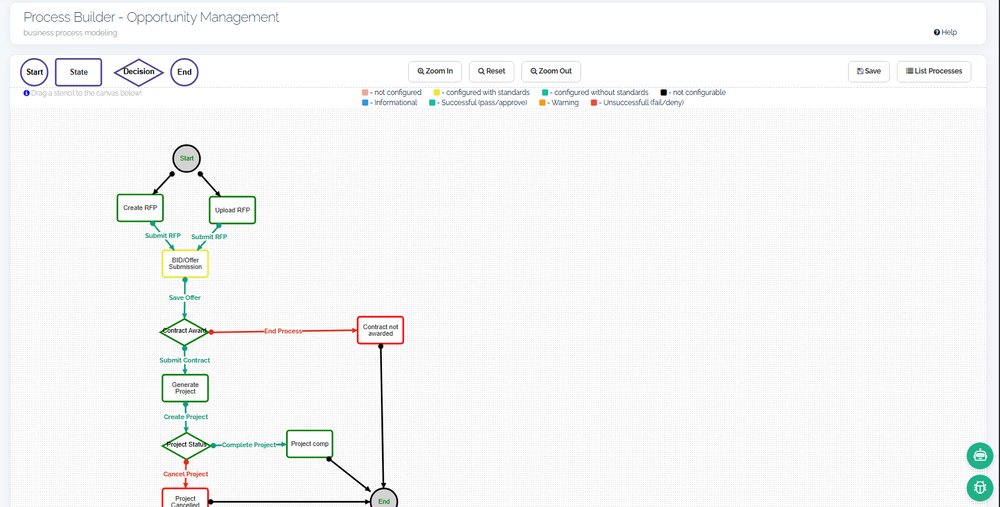
The Process Builder canvas — an opportunity process drawn as states, decisions and transitions, each state coloured by its configuration status.
What that gives you
- Parallel branches
- A running request can hold several active states at once, so review tracks that genuinely happen in parallel are modeled as parallel — not forced into a single queue.
- Time limits with scheduled escalation
- A state can carry a time limit and an escalation target. Actions on a transition fire immediately; overdue-step escalations run on a schedule.
- Verification gates
- A state can be marked to require verification against your documented standards before the process may pass — a controlled gate, recorded on the instance.
- Stakeholders managed in flight
- Transitions can add or remove stakeholders on a running request, so the right observers are attached as the work develops.
- Versioned definitions
- Every saved revision of a process is retained, so what changed — and which definition a given request ran under — stays traceable.
What this touches
- Organization & positions
Actor groups resolve against positions and units — the seat receives the work, whoever holds it. - Form Builder
Each state can present a bound, versioned form; submitting it advances the instance. - Document Template Designer
A transition can generate a merged PDF from the request’s own data. - Task Management
A transition activity can generate tasks for the people who must act next. - Document Management
Files attached to a request live in the governed document store under position-based access.