

Warehouse Dashboards
How do you see all warehouses at once — and each one in depth?
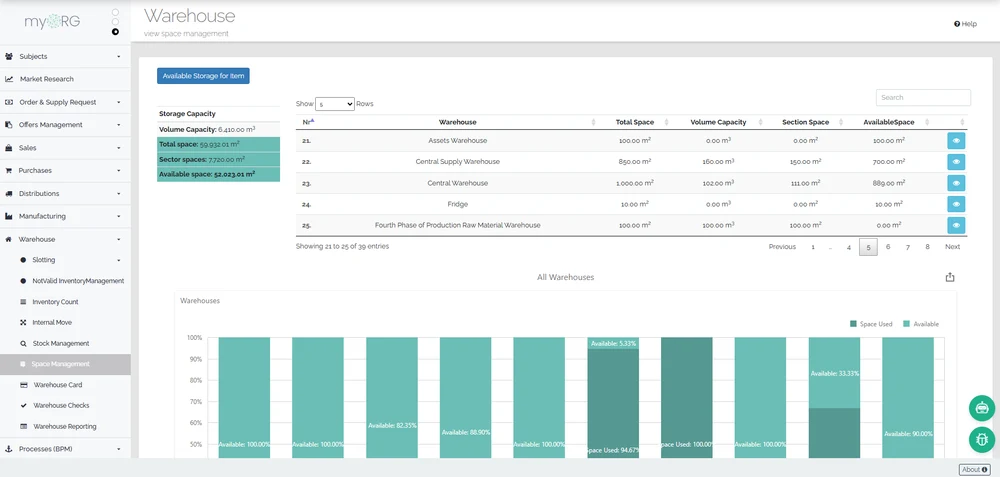
The network view is built in: an all-warehouses dashboard and an all-sectors dashboard summarize the whole operation, while a single-warehouse dashboard carries the local depth. A hierarchy view shows the warehouse tree, and condition alerts surface where storage rules are breached.
How it works
Two levels of dashboard match how multi-site operations are actually run. The all-warehouses and all-sectors views give central operations one picture across every site; the single-warehouse dashboard gives a site manager the depth of their own location without the noise of the rest.
The hierarchy view renders the warehouse tree itself — main site, branches, and their relationships — while the warehouse alert feed brings storage-condition breaches to the surface where they will be seen.
Beyond the built-in views, custom reports and dashboards over the same records are built with the platform report and dashboard designers.
What the view returns
Drawn from WarehouseScoped toThe whole network, or one warehouse in depth
Network-wide dashboards
All-warehouses and all-sectors views summarize every site in one place.
Single-warehouse depth
Each site has its own dashboard for local operation.
Hierarchy view
The warehouse tree is rendered as a view, branches included.
Condition alert feed
Storage-condition breaches surface as alerts in the oversight views.
What this touches
- Multi-warehouse network
Dashboards summarize the hierarchy the network defines. - Stock ledger & visibility
The positions the dashboards show come from the stock ledger. - Storage conditions
The alert feed carries condition breaches into the oversight views. - Builders
Custom reports and dashboards over warehouse records are built with the platform designers.
See warehouse dashboards running in continON.
A guided walkthrough on a sanitized demo tenant — this capability inside its module, on the shared platform.